
For Odoo support partners
Supercharge your Odoo Helpdesk.
Every ticket arrives with the evidence attached. Errors report themselves, duplicates merge into one ticket, and AI Triage can read each one before your team does.
Odoo 16 to 20 and Odoo Online · 14-day free trial per database
Subject: it's broken
Hi, the invoice thing isn't working again. Can you have a look? Thanks
Three days later, still no fix started.
Support today
When every ticket starts with "it's broken".
Your team can't start fixing until they know what went wrong. So they ask, wait, and ask again.
No screenshot, no steps to reproduce. Just a vague email and a hunch about which screen it was.
Back and forth before work can start. Which record? Which user? What did you click?
Silent errors. Problems nobody reports until they have already caused damage.
Reporting from inside Odoo
Reported from the screen where it happened.
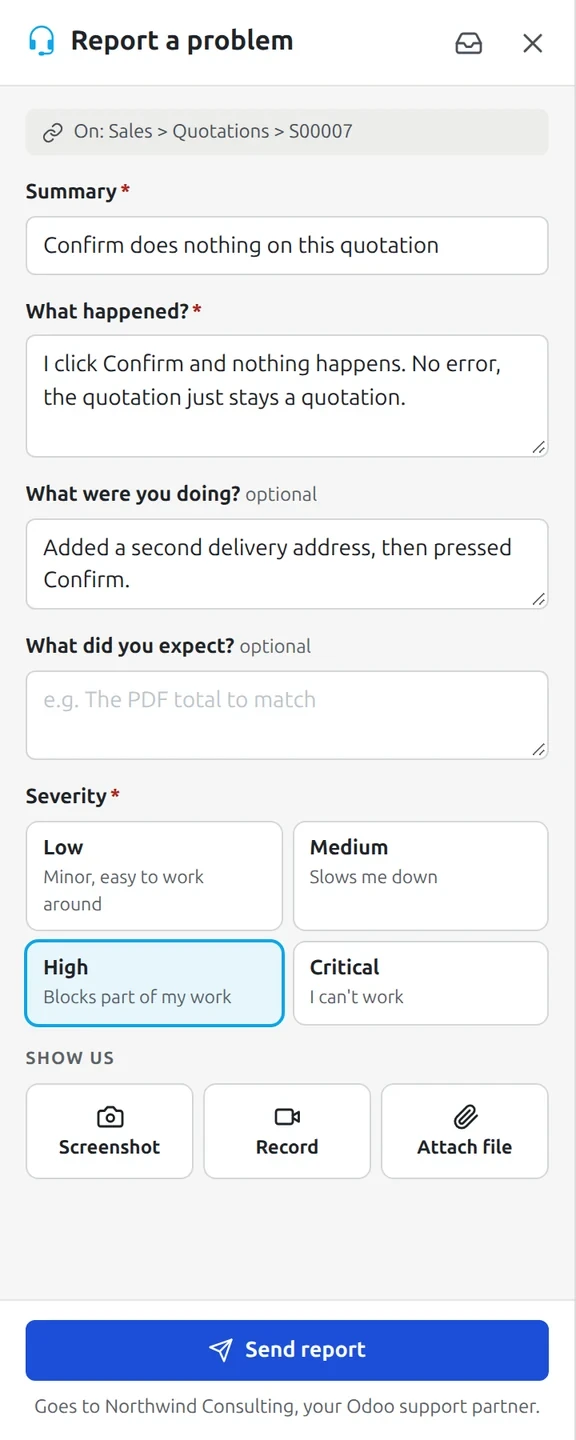
The client's user clicks the Houston headset in the Odoo top bar, or Report issue on an error dialog. They describe the problem and send it, and everything your team needs comes attached.
Annotated screenshots, screen recordings with voice, and files, so the user can show and tell.
Diagnostics, attached automatically: traceback, browser console, recent server calls and screens, the server log, variable values and the audit log.
Sensitive data stays private. Passwords and sensitive fields are blurred in screenshots, and secrets are redacted from logs and variables.
Your own questions on the report form, with conditions, for manual tickets, error tickets or both.
Set up your way. Set defaults for all your clients, then fine-tune each one. Choose what is included on the ticket and how long data is kept.
Hover or tap
Errors report themselves
Problems caught before anyone picks up the phone.
Server and browser errors are captured as they happen, including failed scheduled actions and errors your client's website visitors hit.
Duplicates fold into one ticket with an occurrence count, and you are alerted at 10, 100, 1,000 and 10,000.
Straight to the failing code. Each error shows the failing call, the component and the custom module it came from, with captured variables.
One root cause per fault. The same fault on several of a client's databases becomes one root cause, or across all your clients if you turn that on.
Set up custom rules for automatic tickets.
Decide what happens to each kind of ticket before anyone sees it.
Apply a rule to all clients, one client or one database, with an optional end date.
A silenced error wakes up again if it goes over a set number of hits in 24 hours.
Triage
Beta · early accessHave AI read every ticket before your team does.
The moment a ticket arrives, Triage works out whether it is real, how urgent it is and what to do next. Your team starts with real insight.
On every new ticket, Triage gives you:
A verdict. Real issue, not an issue, or duplicate.
A priority, and how confident it is.
A short explanation of what is going on.
Up to three next steps.
Related tickets, linked for you.
A "code fix required" flag when the fault is in code.
Runs on OLaunch's AI. Connecting your own AI account is coming soon.
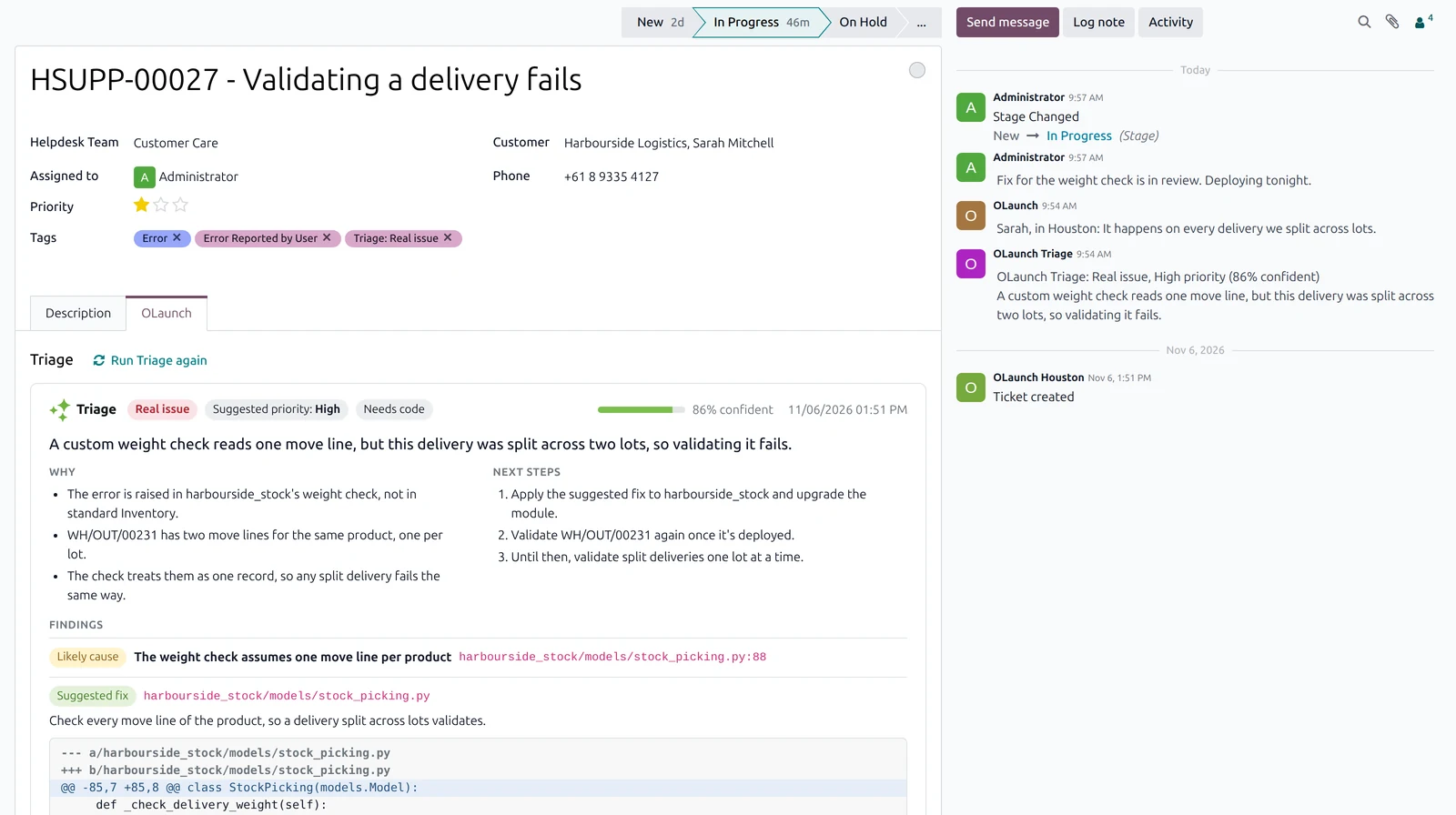
A custom weight check reads one move line, but this delivery was split across two lots, so validating it fails. The same error was auto-reported four times on this ticket.
A brief connection drop while sending queued mail. The queue retried and the messages went out. No user was affected.
Suggest only: Triage proposes, your team accepts or dismisses each suggestion.
Act automatically: when Triage is 85% sure or more, it applies its own actions. Every one can be undone.
Triage only ever closes automatically captured errors. Anything a user wrote always reaches your team.
Reverse any action Triage takes with one click.
Mark a destination "Triage first" and it gets a ticket once Triage has read it.
Connect your code for even better insights.
Optionally connect GitHub or GitLab (your own GitLab too) and link each database's repositories at the branch it runs. Triage then finds the cause in the code, down to the file and line, and suggests a fix.
The exact file and line, with a suggested fix, at the branch that database runs.
Delivered where you work
Choose where your tickets go.
Your Odoo Helpdesk
Synchronises tickets into your Odoo Helpdesk, creating clients or linking to existing ones.
Send emails with screenshots, links to recordings and logs, and your own template.
Webhook
A signed JSON POST for Zapier, n8n or your own system, which can send status updates back.
Telegram
The Houston bot posts to a chat or group. Allow updates and anyone there can change status or priority, or reply to add a note.
Stages sync back, both ways.
Choose what stays in sync between your Odoo Helpdesk and Houston: status, assignee, priority, closing message and internal notes.
OLaunch Partner add-on (optional): a Houston tab on each Helpdesk ticket with Triage's verdict and findings, feedback and actions, related tickets as smart buttons, and changes that reach Houston straight away.
Filters per destination: databases, minimum severity, manual or error tickets.
A delivery log for every ticket sent, plus test messages.
Stops when broken: a webhook or Telegram destination that keeps failing switches itself off.
White label
White label Houston support.
Don't want your clients to know about OLaunch? You can white-label everything.
Your product name, logo and colours on the report panel, its dialogs and My Reports.
Emails to reporters come from your name, with your logo.
Your own reference, like NWS-01192.
Linked wherever your client's users see Houston.
Built for your clients' Odoo.
Works on Odoo.sh, on-premise and Odoo Online.
How to set it up
Three steps.
Turn Houston on
Switch it on for the client's database in OLaunch and choose what a ticket may collect.
Install and pair
Install the Houston module in the client's Odoo and pair it with a one-time code from OLaunch.
Choose where tickets go
Email, a webhook, Telegram or your own Odoo Helpdesk.
The client sees progress
No more "any update?" emails.
Do you want your clients to see their tickets? Turn on My Reports and their users can follow what they reported, right inside their own Odoo, without chasing your team.
FAQ
Questions partners ask.
Know about the problem before your client does.
Try the instant demo, or book a time and we'll walk you through it.